
A digital journal app for Windows 11
Journal by hand on a Windows tablet, on pages that look and feel like a notebook. It stays private on your PC, you can search your own handwriting for any entry, and when the year is done you can hold it as a book.
A pen journal is not a typed diary
Search for a journal app for Windows and most of what comes back is a typed diary: a text box, a date, maybe a mood. That suits some people. But if you journal by hand, you know it is a different thing. It is slower, it is yours in a way typing is not, and a drawing, an arrow or a pressed ticket sits right beside the words.
A good handwritten journal on a tablet needs a few things a typed diary never thinks about:
- real pages, not an endless canvas you lose your place on
- pens that respond to your hand
- room for photos, tickets and stickers
- a way to find an entry from months ago
- privacy that does not depend on someone else's server
- a way to keep it once the year is over
Pages, not an endless scroll
Every Mementa notebook is a book with real pages, in a real book shape. Portrait suits most journals. Write past the end of a page and the next one is there. Open the notebook later and it is on the page you left. In Book Mode, flip back through it as a two page spread with page turns that behave like paper.
Choose your paper
Dot grid for bullet journaling, lined for writing, blank for sketching, a yellow legal pad for lists. Apply it to one page or the whole journal. Or bring your own: a daily template, a gratitude page, a habit tracker, saved as a template and used on any page. See page backgrounds.
Pens that feel like your own
A round pen for everyday writing, a fountain pen whose line swells and thins with the direction you write, a pencil that catches the grain of the paper, and a highlighter that stays flat. Each remembers its own color and size. Rest your hand on the glass while you write: the pen draws, your palm does not. See the pens and palm rejection.
Add the day
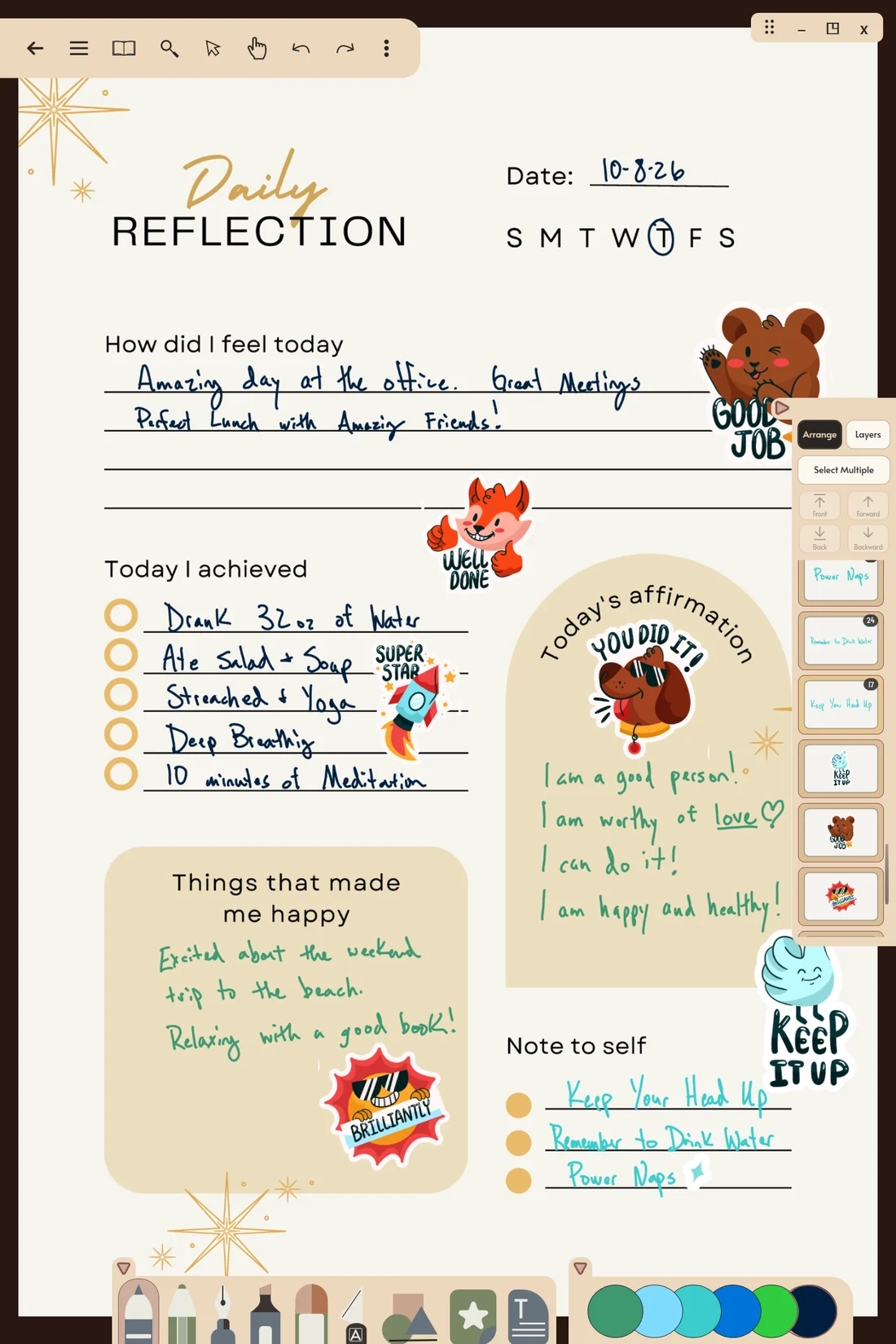
A journal page is often more than words. Open the sticker drawer and tap the add tile to bring in photos from your PC, or paste a picture you copied in another app. Crop it without losing the rest, cut a shape out of it with the Knife, and write a caption beside it. Stickers you own, sticker sheets you buy, and doodles you turn into stickers all live in one Sticker Book that every journal can use.
Sticker artwork shown on this page is designed by Magnific and appears for illustration only. It is not included in the app. You bring your own sticker packs.
Find any entry again
The problem with a paper journal is finding the day you wrote about something. Mementa Notebook reads your handwriting in the background, on your own PC, so you can search every journal on your shelf for a word you wrote by hand. Tap a result and the journal opens on that page with the word flashing. You never have to convert your writing to text. See handwriting search.
Private by default
Your journal is saved in a folder on your own PC. There is no account, no cloud sync, and no analytics watching what you write. Handwriting recognition and search run on the device. See a private journal app.
Keep it
At the end of the year, or at the end of a trip, a pregnancy, a first year at school, order the journal as a real printed book: softcover or hardcover, one copy, shipped to your door. Because it was made in a book shape from the first page, there is nothing to resize. See turn your journal into a book.
A simple way to start
- Choose Start a new notebook and pick the Portrait shape and a cover.
- Set the paper: dot grid or lined, on every page.
- Write the date at the top, by hand, or in a text box with Scribble.
- Write. Add a photo or a sticker if the day earned one.
- Tomorrow, carry on past the end of the page and the next one appears.
Questions
Is there a handwriting journal app for Windows?
Yes. Mementa is a pen first journal and notebook app for Windows 11 tablets and 2 in 1 laptops. You write by hand on real pages, and it can turn handwriting into text or search it when you need to.
Can I keep a bullet journal on Windows?
Yes. Use the dot grid paper, draw your own spreads, and save any page you like as a template to reuse.
Is my journal private?
Your journal stays on your PC. There is no account and no cloud sync, and handwriting recognition runs on the device.
Can I lock my journal with a password?
Mementa has no password lock of its own. Your journal is protected by your Windows sign in, like your other files.
Can I type in my journal too?
Yes. Add text boxes anywhere on a page, type with the keyboard, or write beside a box with your pen and watch it type itself.
Does it sync with my phone?
No. Mementa runs on Windows 11 and keeps your journal on your PC.
Try it yourself
$4.99 once, and Mementa is yours. Every update included, and no subscription, ever.
Get it on the Microsoft Store