
Write by hand, keep it as text
In a lot of apps, converting handwriting sends you somewhere else: a panel opens, a strip appears at the bottom of the screen, or your writing goes off to a separate mode. In Mementa Notebook the words become text where they already are, at the same size and in the same color, on the same page.
There are two ways to do it.
Lasso it, then hold
- Draw a loop around your writing with the Knife.
- Press the pen onto the selection and hold it still.
- Keep holding for about half a second. The selection shades in to show progress, then the ink is replaced by typed text in the same spot. Lift early to cancel.
- The text arrives already selected, so you can move, resize or rotate it straight away.
Write beside a text box
Open a text box with the Text tool and write anywhere on the page. Pause for a beat and your words flow into the box as typed text while the ink fades away. Keep writing and the cursor keeps moving with you. That is Scribble, and it is the quicker way when you know from the start that you want typed words.
Nothing converts by accident
A plain lasso with no hold still just selects your ink, exactly as it always did. The hold is the whole gesture, so you never lose handwriting you meant to keep. And one undo puts converted writing back the way you wrote it, strokes and all.
It learns your hand
Recognition starts out general and gets more like you as you use it. Three things improve, all of them on your own machine:
- Your language. Recognition follows the language the app is set to, so Spanish, German and French writing are read as themselves rather than as misspelled English.
- Your words. Names, places and odd spellings you write often start winning over the generic guess. It can improve on the plain result, never do worse than it.
- Your corrections. Scribble over a word it got wrong and write it again. That fix is remembered next time.
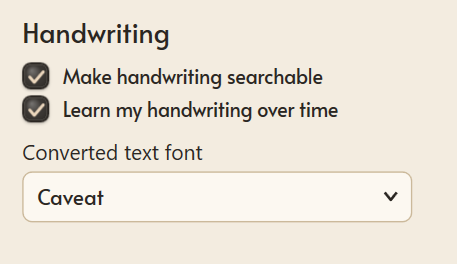
Nothing arrived trained on anyone else's writing. If you would rather have the plain result, switch off Learn my handwriting over time in Settings.
Choose the font it lands in
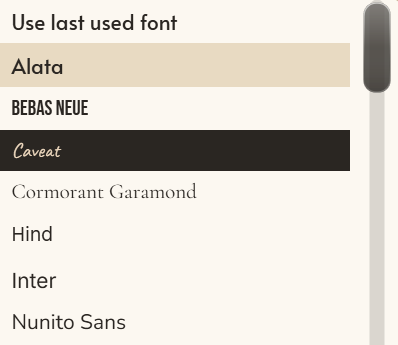
Converted text font, in the same Handwriting section of Settings, decides how your converted writing looks. Leave it on Use last used font and it follows whatever you last picked in the dock. Once it is text, it is an ordinary text box: change the font, the size, the color or the alignment whenever you like.
Private by construction
Mementa uses the handwriting recognizer built into Windows, which runs on your PC, and adds its own learning on top of it. Nothing you write is sent anywhere to be read. It works on a plane, in a classroom with no connection, or with your network switched off.
Since Mementa 2.0 the recognizer runs in its own helper process. If it ever fails, it restarts on its own and the app, and your unsaved ink, carry on.
You do not have to convert to search
If what you really want is to find your notes later, you may not need to convert anything. Mementa reads your handwriting in the background so handwriting search can find a handwritten word in any notebook, while the ink stays ink.
At a glance
- Lasso ink with the knife and hold to convert it where it sits
- Recognition runs on your own device, nothing is uploaded
- Converted text lands in a font you choose and stays editable
- One undo puts your handwriting back
- Recognition adapts to your language, the words you write often, and the corrections you make
Questions
Does handwriting to text work offline?
Yes. Recognition runs on your own PC with the recognizer built into Windows. Nothing is uploaded, and no connection is needed.
Which languages can it read?
English, Spanish, German and French are what it is built and checked for. Recognition follows the language you set in the app. Mementa's interface is also in Dutch and Hindi, but handwriting recognition in those two is not something it promises.
How accurate is it?
Neat handwriting converts well, and a messy hand improves as it learns your words and your corrections. No recognizer is perfect, which is why one undo always gives you your ink back.
Can it convert a whole page at once?
Yes. Lasso as much writing as you like, a word, a line or a whole page, and it converts in one go. Leave drawings outside the loop, so only the writing is read.
Can it read handwritten math?
No. It reads words, not equations.
Try it yourself
$4.99 once, and Mementa is yours. Every update included, and no subscription, ever.
Get it on the Microsoft Store