
Why it exists
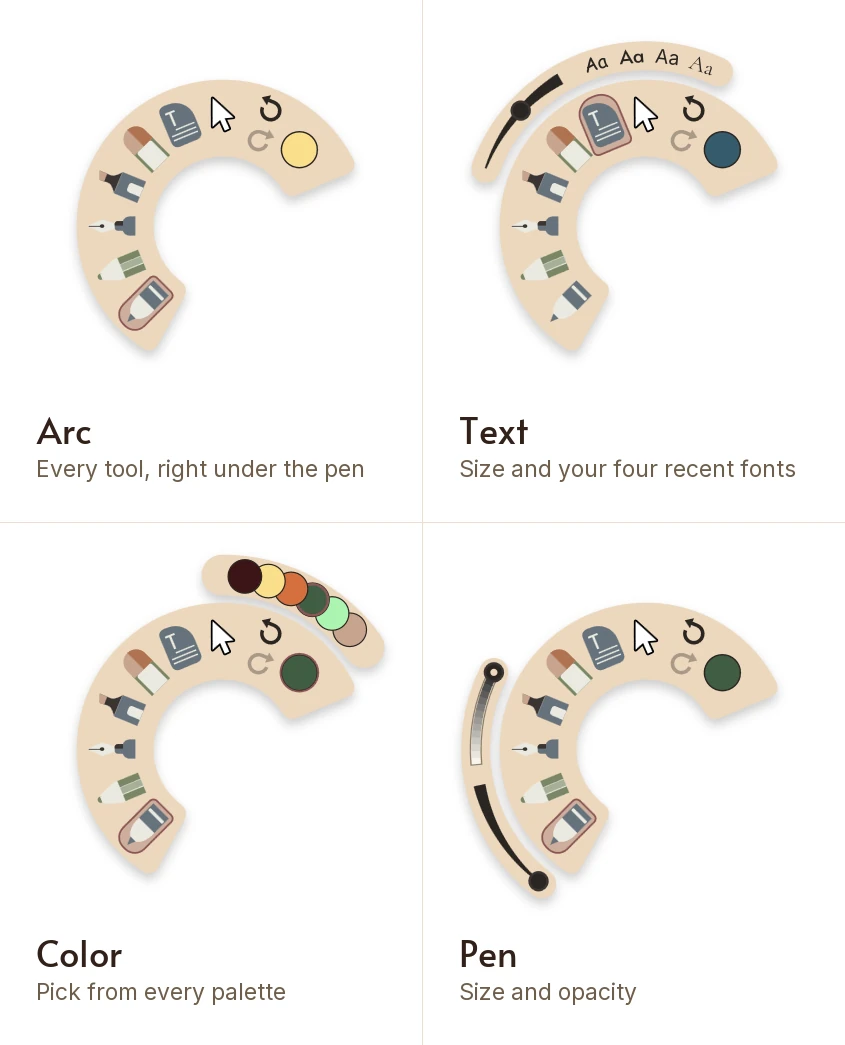
On a tablet, the tool dock is always on the other side of the screen from your hand. Every change of pen means lifting your hand, crossing the page, tapping, and finding your place again. Arc turns that round. It opens under the pen, wherever the pen is, and closes the moment you go back to writing.
How to use it
- Hold the tip just off the page and double-click the side button.
- Pick a tool, a color, undo or redo. Arc stays open while you pick, so a tool and its color take two taps.
- Tap the lit tool again for its rail: a pen's size and opacity, or for text, the size and your four most recent fonts.
- Tap the color to choose any color from any of your palettes, swiping between them.
- Tap the page to put it away. That tap leaves no mark.
What is on it
Arc holds the writing loop: the round pen, the pencil, the fountain pen, the highlighter, the eraser, text and the Cursor, plus undo, redo and color. It is the same Arc on every tool.
The color button also recolors whatever shape or text box you have selected, even on the Cursor. And with the Text slot, handwriting you just converted to text can be resized and given a new font without opening the dock.
Why a double-click in the air
The first version opened with a double-tap on the page. A pen has to ink the moment it touches, so a tap could only guess and then take the ink back, and two deliberate dots were only a few pixels from counting as a double-tap. Notes ended up with stray marks. A double-click in the air touches nothing, so it leaves nothing.
A single click keeps its own job: it still switches between the Cursor and your last tool. Near the edge of the screen, Arc slides inward to fit rather than turning.
Feel it open
On a pen with a haptic motor, such as the Surface Slim Pen 2, the pen gives a small click when Arc opens, because the gesture happens in the air with nothing under the tip to confirm it. See pen haptics.
At a glance
- Double-click the pen's side button with the tip off the page and Arc opens under it
- Pick a tool, a color, undo or redo without crossing the page to the dock
- Arc opens wherever the pen is, so your hand never leaves the writing
- It works on every tool, not a chosen few
- It stays open while you pick, and a tap on the page closes it without leaving a mark
- Change a pen's size and opacity right on Arc
- Set the text size, and pick from your four most recent fonts
- Pick any color from any of your palettes, swiping between them
Questions
Can I choose which tools are on Arc?
No. Arc holds the same set every time, the tools you reach for while writing, so it is in the same place under your pen whatever you were doing.
My double-click switched tools instead of opening Arc. Why?
The two clicks have to come close together. A slower pair reads as two single clicks, and each single click switches between the Cursor and your last tool. Click twice quickly with the tip held just off the page.
Is Arc the same as the Windows pen menu?
No. Windows 11 has its own pen menu, a set of app shortcuts on the taskbar. Arc lives inside Mementa Notebook: it opens on the page, under your pen, with your Mementa tools and colors.
Does Arc work with a mouse or a finger?
No. It needs a pen with a side button. With a mouse or a finger, the tool dock does the same jobs.
Is Arc new?
Yes. It arrived in Mementa Notebook 2.0. Every update is included in the one payment, so everyone who owns Mementa has it.
Try it yourself
$4.99 once, and Mementa is yours. Every update included, and no subscription, ever.
Get it on the Microsoft Store